
COBB Accessport Instructions
These are the instructions for doing a CT Tuning ProTune with your COBB Accessport. Go here for Official COBB Accessport Instructions
***IMPORTANT***
- YOUR CAR SHOULD BE RUNNING CORRECTLY PRIOR TO PURCHASING A MAP.
- MY ASSISTANCE ON TROUBLE SHOOTING DOES NOT ENABLE YOU FOR A REFUND, IF I CANNOT COMPLETE THE STATE OF THE TUNE
- DUE TO MECHANICAL ISSUES WITH YOUR CAR.
- WE WILL REVIEW LOGS FOR 30 DAYS FROM DATE OF PURCHASE.
Subaru Owners
- STOP!!! MAKE SURE YOU HAVE THE LOGGING PROFILE LOADED AND SELECTED BEFORE LOGGING.
- IF YOU HAVE AN ETS INTAKE, REMOVE THE RESTRICTOR SLEEVE.
- FLEX Fuel, Please start logs using Pump gas. Keep tank low as we will need it empty to start the E85 logs.
UPLOADING, LOADING, AND LOGGING WITH THE COBB AP
***BEFORE LOGGING BE SURE YOUR ENGINE IS WARMED UP***
***If your car has I-Drive… The car needs to be in S# for logs*** MAKE SURE THE CAR IS IN SPORT SHARP MODE!!!!
***DO NOT RENAME THE MAP!!!!!!***
Make sure to always use the latest version of the Cobb MAP manager software.
If you have trouble loading a map to the AP, or from the AP to the car, Update the AP Firmware using the map manager software.
UPLOADING A MAP TO AP:
- Download the map from your email to the computer desktop.
- Open the Accessport Map Manager and drag the new map into the library (window showing maps) or right click the new map and select “Upload to Accessport.” Your new map is now loaded onto your AP. Some computers will not allow a drag and drop. In that case click the upload map to port button and select the CTT protune map file.
LOADING A NEW MAP TO YOUR CAR:
- Please load map to the Accessport using the free Map manager software from Cobb: Download Here
- Plug the dongle into your OBDII port under the drivers side dash and the other end into the accessport.
- Turn your car on, but do not start it. When the AP connects to your ECU, go to the main menu and select “Tune,” then “Change Map,” and then “Re flash.” Select the CTT Protune map.
- The AP will direct you what to do with each step, which will be the following:
DO NOT DO OR TOUCH ANYTHING WHILE THE MAP IS LOADING.
- Follow Accessport Prompts to finish the map loaded process.
- Make sure to wait a full 15 seconds after the process is complete.
- Turn key on, Or press start button TWICE with your foot off the clutch. Let the ecu boot up and the dash gauges sweep. You may start car now.
LOGGING WITH THE COBB AP:
We have emailed you a Logging Parameter File to download or contact us to get this. You can load this with the Cobb software and it will select the parameters for you. More Details can be found here – https://cobbtuning.atlassian.net/wiki/spaces/PRS/pages/60260467/Data+Log+Presets#Loading-a-List-of-Datalog-Monitors
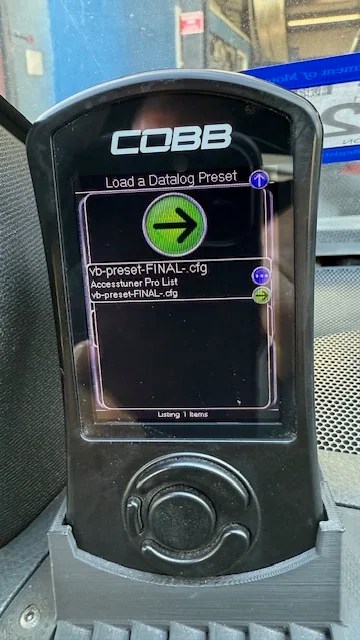
*Please be aware that the COBB AP only reads boost up to about 24psi or so. Any higher than that and it will still read 24 to 24.5psi.
Do not allow more than 20 psi on the first WOT LOG. If you over boost the engine, You could cause severe engine damage. ONLY YOU CAN LET OFF THROTTLE TO PREVENT ENGINE DAMAGE!
LOGGING:
- !!!!!ONLY DO 3 DATALOGS!!!!! DOING MORE ON AN UNTUNED CAR OR A CAR WITH MECHANICAL PROBLEMS COULD RESULT IN ENGINE DAMAGE.
- ONLY DO A SINGLE WOT LOG!!!!
- If your car has a custom setup with big turbo and injectors DO NOT BOOST ENGINE! Only do the idle and cruise logs. Send them to me with the map. Once I see everything is OK. I will ask you to boost it.
- DO NOT DO ANY LOGGING if the car has check engine lights. READ the codes using the AP and report the codes to me via email.
CRUISE LOG:
- Steady 45 or 55mph cruise log for aa few minutes or more around 3000 rpm.
- On your AP, select “Monitor” and then “Data Log.” Press the center button to start logging. The AP will indicate that it is logging with the word “logging” on the screen. Drive around some steady state cruising at 45 MPH or so for a few minutes.
PULL LOG: DO ONLY ONE WOT LOG
- Full Throttle Pull from 3,000 rpm to 5,000 rpm. Later, Once I have car in tune, I might ask for a higher rpm log.
- 5 speed: Use third gear
- 6 speed: Use third gear
- Find a nice stretch of open road free from law enforcement and any other potential dangers.
- When all is clear, accelerate very slowly through 1st and 2nd so that when you hit 3rd gear your rpms are below 3,000. Hit the center button on the AP once again to begin logging. Floor it, and keep it floored. Accelerate until 5,000 rpm. Release the gas pedal and immediately press the center button on the AP to end the logging session.
IDLE LOG:
- Relaxing at Idle for two minutes with the A/C off. Start the logger again by pressing the center button. Allow the car to idle for two minutes while the logger logs. Stop logger.
- You can do this log last when you get back home after logging.
- You have now successfully completed the required logs.
After Logging:
- Hook up the AP to your computer with the supplied USB cable.
- Open Cobb MAP MANAGER software.
- Download the three log files to your computer.
- REMEMBER TO ALWAYS SEND THIS MAP ALONG WITH THE DATALOGS!
- I will then review your logs and edit the map. I will send you the a new map and sometimes some instructions for logging. The process for logging is repeated.
We respond during normal business hours. If you need faster service or after hours/weekend response, please purchase the expedited service option here.